
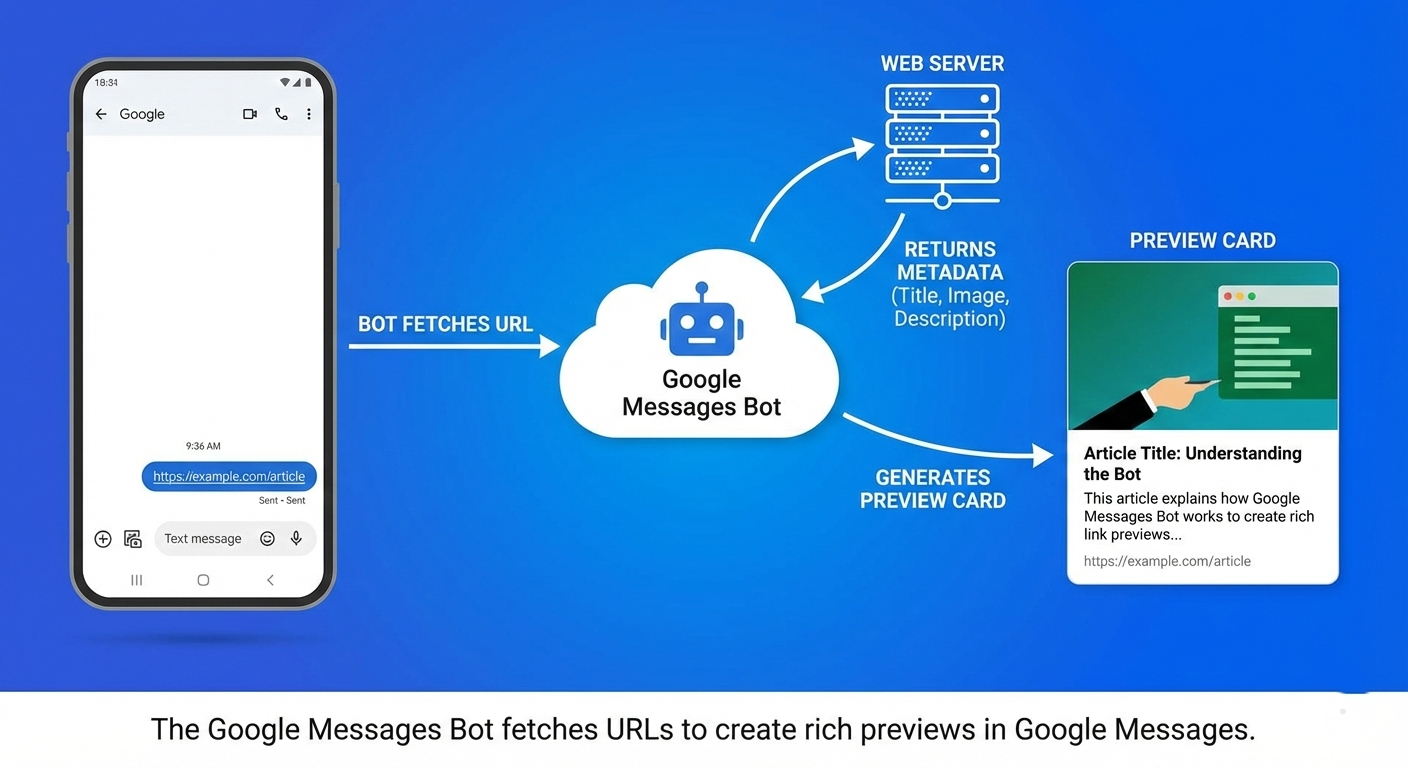
Google recently introduced a new web crawler called the Google Messages Bot. Unlike Googlebot, which indexes websites for search results, this bot’s main function is to fetch URLs shared in Google Messages and generate link previews. This change directly affects your site’s visibility, crawl performance, and how content appears in Google’s search engine results and messaging ecosystem.
For marketers, SEOs, and site owners, understanding the Google Messages Bot is crucial to ensure that shared links display correctly and engage users effectively.
What the Google Messages Bot Does
The Google Messages Bot crawls URLs shared through Google Messages. When someone sends a link, the bot fetches the page, reads its meta title, description, and images, and generates a rich preview in the chat.
In fact, the bot improves user experience by making shared links more informative, boosting trust, and encouraging clicks.
Key features:
- Works exclusively with Google Messages URLs
- Focuses on content display, not search indexing
- Uses metadata to generate rich preview cards
Why Your Website Needs to Be Bot-Ready
Although the Bot does not directly influence search rankings, it impacts engagement and user experience significantly:
- Preview Appearance
Well-formatted titles, descriptions, and images make your links look professional in messages. - User Engagement
Attractive previews can increase click-through rates when users share links. - Content Accessibility
Ensure pages load quickly, render on mobile devices, and have clear metadata. Doing so guarantees that the bot can fetch your pages successfully.
Moreover, optimized pages create consistent, trustworthy previews for every shared link.
How the Bot Operates
The bot functions similarly to social preview crawlers like Facebook’s Open Graph or Twitter Cards, but it optimizes for Google Messages:
- Fetch Request: When a link is sent, the bot visits the URL.
- Metadata Reading: It extracts the title, description, and featured image.
- Preview Generation: The bot creates a visually appealing card for the chat.
Webmasters can check server logs for the Google Messages Bot user-agent:
Mozilla/5.0 (compatible; Google Messages Bot/1.0; +https://developers.google.com/search/docs/crawling-indexing/google-messages)
Therefore, you can confirm the bot’s activity and ensure it accesses your pages without being blocked.
Best Practices for Optimization
To make the most of Google Messages Bot, implement the following strategies:
- Optimize Meta Tags
Use concise, descriptive titles and meta descriptions to summarize your pages. - Add Representative Images
Include clear, high-quality images with properalttext. Recommended size: 1200×630 px. - Ensure Mobile Responsiveness
Since most messages are viewed on mobile, pages should load quickly and render correctly. - Monitor Server Logs
Track the bot’s visits to ensure it can crawl your pages smoothly. - Use Open Graph and Schema Markup
While optional, these elements improve the accuracy of link previews.
Additionally, continuous monitoring ensures previews remain accurate and engaging.
Benefits of Optimizing for Google Messages Bot
Optimizing for the bot delivers tangible advantages:
- Enhances user trust in shared links
- Increases click-through rates and engagement
- Maintains consistency of brand presentation
- Reduces broken previews and visual errors
Consequently, webmasters who adapt early can maximize link performance across Google Messages.
Future Outlook
Google is expanding its ecosystem for messaging and AI-driven link previews. Webmasters should anticipate:
- Enhanced preview capabilities with dynamic content
- Integration with AI tools to improve content summaries
- Global adoption across Android devices, Gmail, and other Google apps
In fact, staying ahead ensures your content appears accurate, professional, and trustworthy wherever shared.
Conclusion
The Google Messages Bot represents a subtle but important evolution in Google’s web ecosystem. While it does not directly influence search rankings, optimizing pages for rich previews boosts engagement and trust. By applying best practices, including clear meta tags, mobile-friendly pages, and representative images, webmasters can ensure every shared link looks professional and compelling.
In summary, preparing your website for the Google Bot is both strategic and user-focused, a small step that yields significant engagement benefits.

Hello. remarkable job. I did not expect this. This is a great story. Thanks!